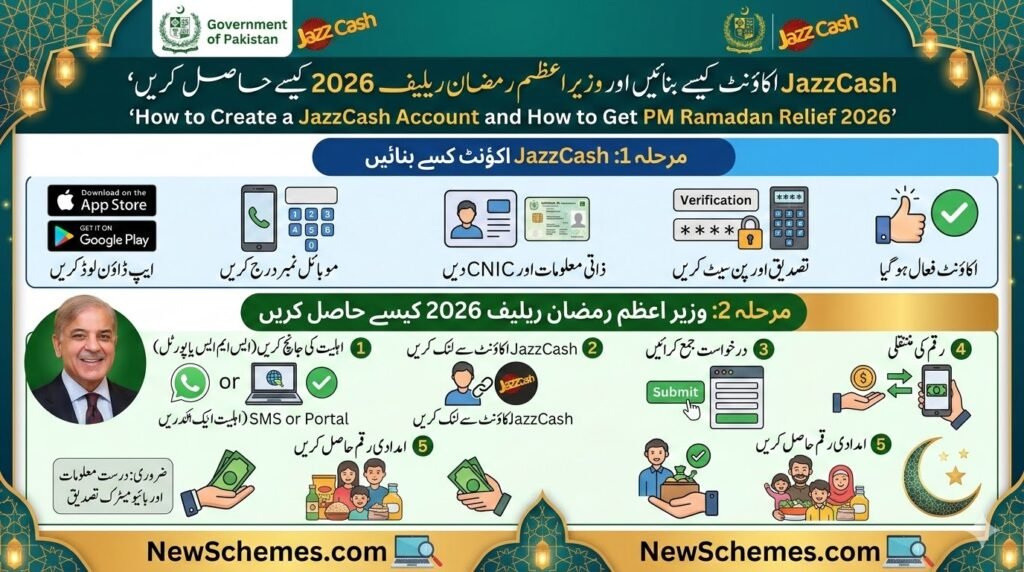
How to Create a JazzCash Account and Receive PM Ramadan Relief 2026
Introduction
The Government of Pakistan has introduced financial assistance programs to support low-income families during Ramadan. One of the easiest ways to receive payments from these programs is through a mobile wallet like JazzCash.
With JazzCash, citizens can receive government relief funds, send money, pay utility bills, and manage financial transactions directly from their mobile phones.
This guide explains how to create a JazzCash account and how eligible families can collect payments from the Prime Minister Ramadan Relief Package 2026.
Requirements to Create a JazzCash Account
Before creating a JazzCash account, make sure you have:
- A valid CNIC
- A mobile SIM registered on your CNIC
- A smartphone to get the JazzCash app
- Active mobile network coverage
Registration is simple and usually takes only a few minutes.
Steps to Create a JazzCash Account
Method 1: Using the JazzCash Mobile App
- Open Google Play Store or Apple App Store.
- Search for JazzCash – Mobile Account.
- Get the app and install it.
- Open the app and tap Register.
- Enter your mobile number and CNIC number.
- Create a 4-digit MPIN for account security.
- Complete verification using OTP or biometric confirmation.
Once verification is complete, your JazzCash account will be activated.
Official page to get the app:
https://www.jazzcash.com.pk/mobile-account/
Method 2: Create Account via USSD (For Jazz SIM Users)
- Dial *786# from your Jazz SIM.
- Select Mobile Account Registration.
- Enter your CNIC number.
- Create a 4-digit MPIN.
Your mobile wallet will be created instantly.
How to Receive PM Ramadan Relief Through JazzCash
Eligible families can receive government payments through mobile wallets. After your JazzCash account is active:
- Check your eligibility through the official government portal.
- If eligible, you will receive an SMS notification.
- The amount can be collected through:
- JazzCash mobile app
- JazzCash agents
- ATMs (where supported)
Always bring your original CNIC when collecting funds from an agent.
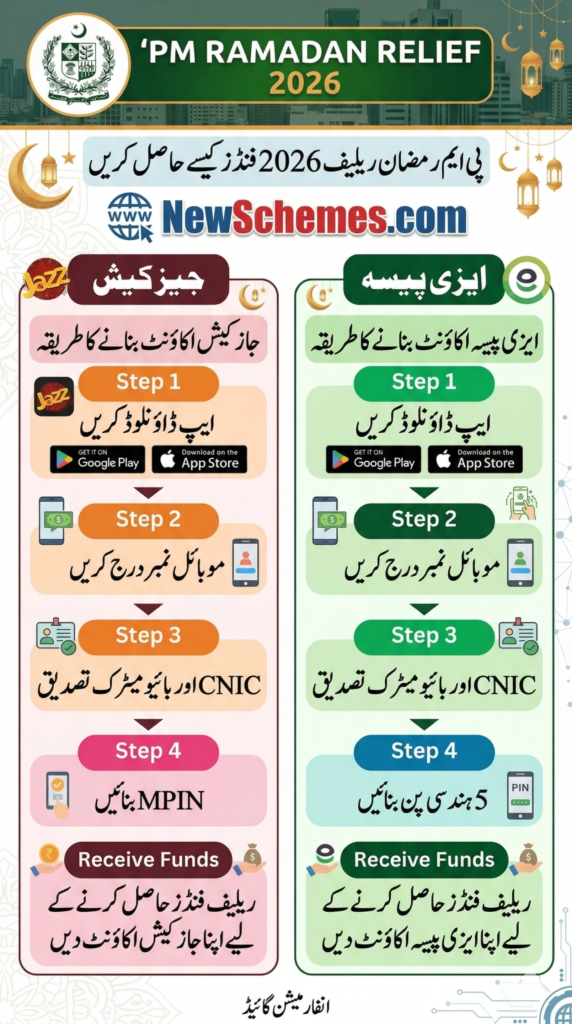
Check PM Ramadan Relief Eligibility
Citizens can check their eligibility online through official government portals.
BISP 8171 Portal:
https://8171.bisp.gov.pk
PM Relief Portal:
https://pmrrp.nitb.gov.pk
Enter your CNIC number to check your eligibility and payment status.
Benefits of Using JazzCash
Using JazzCash offers several advantages:
- Receive government payments quickly
- Send money anywhere in Pakistan
- Pay electricity, gas, and internet bills
- Secure mobile wallet with PIN protection
Important Safety Tips
To protect your money and account:
- Never share your MPIN or OTP with anyone.
- Only trust messages from official numbers like 8171.
- Avoid clicking on unknown links shared on social media.
How to Create an EasyPaisa Account and Receive PM Ramadan Relief 2026
Introduction
Mobile wallets have become one of the most convenient ways to receive financial assistance in Pakistan. One of the most widely used services is Easypaisa.
Through EasyPaisa, citizens can receive government relief payments, transfer money, pay bills, and manage their finances easily from their phones.
This guide explains how to create an EasyPaisa account and how to collect payments from the Prime Minister Ramadan Relief Package 2026.
Requirements for Opening an EasyPaisa Account
To create an EasyPaisa account, you need:
- A valid CNIC
- A mobile number registered on your CNIC
- A smartphone to get the EasyPaisa app
Registration is completely free and takes only a few minutes.
Steps to Create an EasyPaisa Account
Method 1: Using the EasyPaisa Mobile App
- Open the Google Play Store or Apple App Store.
- Search for EasyPaisa – Mobile Wallet.
- Get the app and install it.
- Open the app and tap Create Account.
- Enter your mobile number and CNIC details.
- Verify your account using OTP or biometric verification.
- Set a secure PIN code.
Your EasyPaisa wallet will then be activated.
Official website to get the app:
https://easypaisa.com.pk
Method 2: Register Through an EasyPaisa Agent
If you do not have a smartphone:
- Visit a nearby EasyPaisa agent shop.
- Provide your CNIC and mobile number.
- Complete biometric verification.
- Your EasyPaisa account will be activated.
How to Receive PM Ramadan Relief Through EasyPaisa
If you qualify for the government relief program:
- Check eligibility through the official portal.
- If approved, you will receive an SMS confirmation.
- You can withdraw funds through:
- EasyPaisa mobile app
- EasyPaisa agent shops
- Bank transfers (if linked)
Always verify your identity with your CNIC when collecting payments.
Check Ramadan Relief Eligibility
Official eligibility portals:
BISP 8171 Portal
https://8171.bisp.gov.pk
PM Ramadan Relief Portal
https://pmrrp.nitb.gov.pk
Enter your CNIC number to check your status.
Advantages of EasyPaisa
EasyPaisa provides many benefits for users:
- Receive government relief payments easily
- Send and receive money across Pakistan
- Pay utility bills and mobile packages
- Secure digital wallet with PIN protection
Security Tips
To stay safe while using EasyPaisa:
- Never share your PIN or OTP code.
- Avoid fake websites or WhatsApp messages claiming government payments.
- Always check eligibility through official portals.